SFX Manager
NOTE You will want to create a prefab variant of the
Audio Controllersprefab, to ensure that your changes are maintained!
The AudioControllers prefab manages both Music & SFX, and should be in the scene if you intend to call it!
The intention of the SFX Manager is to allow you to easily play SFX, that can then be easily called anywhere within your code, without needing to worry about managing the lifespan SFX, automatically setting sound varieties, channel limits, as well as volume limits
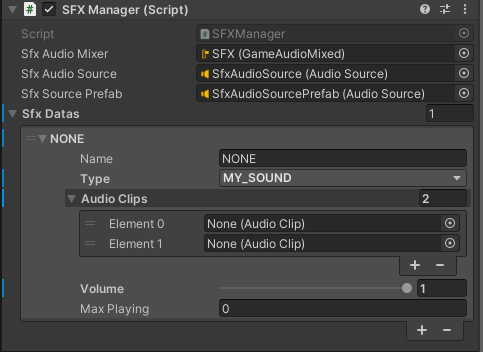
- You can use
Max Playingto help prevent spam. When the value is0it will play unlimited. AudioClipslist will choose a random sound from the list when called, you can use just a single sound if you like.
You can add new enum values into SFX.cs, as this will operate in two locations:
The
Audio Controllersprefab, can then add a new entry- csharp
public enum SFX
{
   NONE = 0,
   MY_SOUND = 1
}
You can then use that enum value in code to play the sound, optionally at a world location
- csharp
SFX.MY_SOUND.PlaySound(volume: 1f); - csharp
SFX.MY_SOUND.PlaySoundAtLocation(transform.position);
You can also optionally include a pitch value!
WARNING
It should be noted that to have pitch functional for 2D sounds, a new
AudioSourceis instantiated, and the pitch value is applied there. Be cautious for sounds used multiple times in a single frame.- csharp
SFX.MY_SOUND.PlaySound(volume: 1f, pitch 1f); - csharp
SFX.MY_SOUND.PlaySoundAtLocation(transform.position, pitch: 1f);