WaitForAnimations
These scripts are designed to allow editor/inspector focused animations that can be used within coroutines, giving you the ability to wait for sections, and to target groups of objects.
The scripts are designed to give you flexibility on what your targeting, and how the values are applied.
Example
In the example below you can see that an animation for a start button plays in one direction, then will return the other once called.
if (startButton)
{
    SFX.SHIFT.PlaySound();
    yield return startButton.DoAnimation(animationTime, ANIM_DIR.TO_START);
}

yield return new WaitUntil(() => _startButton.InputValue >= 1f);

if (startButton)
{
    SFX.SHIFT.PlaySound();
    startButton.DoAnimation(animationTime, ANIM_DIR.TO_END);
}

if (tvScreenAnimation)
    tvScreenAnimation.DoAnimation(animationTime, ANIM_DIR.TO_START);
Animation Directions
These directions are used when deciding how to animate a target
START_TO_ENDEND_TO_START
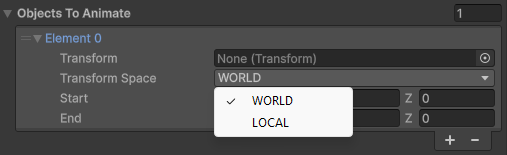
Animation Space
WARNING
Only the Position & Rotation can be effected by the Transform Space.
These enums can be set within the inspector to determine how the animation will be applied.
WORLDLOCAL
IWaitForAnimation
All of the WaitFor animation scripts will inherit from IWaitForAnimation which means it can be easily called without needing to know the contents of how the script operates.
Ideally, when traversing through a Coroutine (For a cutscene, for example), you can call IWaitForAnimation.DoAnimation() and all you have to do is wait for it to complete.
WaitForAnimationBase
NOTE
WaitForAnimationBase contains a public Animate() method, that can be easily called from UnityEvents
When inheriting from this class you will need to specify 2 value types:
TR: the type of transform that will be the target of the animation (Transform,RectTransform)T: The value that will be used when Setting Values & Lerping (Vector3,Vector2,float)
Any new animations should inherit from this class, as it provides the essentials to operate. You will need to provide the content for the following, when creating a new script:
DoAnimation()Lerp()SetValue()Since you may want different animations to affect different properties or items, these will let you control that. Starting values are provided:startingValue: The t value between0.0-1.0that you want these objects to start at when loadingcurve: The animation curve that will be evaluated when callingLerp()objectsToAnimate: You can pass a collection ofAnimationDatawhich will target many objects
WaitForMoveAnimations
Below showcases the requirements for setting a position
public override Coroutine DoAnimation(float time, ANIM_DIR animDir)
{
    return StartCoroutine(DoAnimationCoroutine(time, animDir));
}
protected override Vector3 Lerp(Vector3 start, Vector3 end, float t)
{
    return Vector3.Lerp(start, end, t);
}
protected override void SetValue(AnimationData data, Vector3 value)
{
    switch (data.transformspace)
    {
        case SPACE.WORLD:
            data.transform.position = value;
            break;
        case SPACE.LOCAL:
            data.transform.localPosition = value;
            break;
    }

}
WaitForRotationAnimations
Below showcases the requirements for setting the rotation
public override Coroutine DoAnimation(float time, ANIM_DIR animDir)
{
    return StartCoroutine(DoAnimationCoroutine(time, animDir));
}
protected override Vector3 Lerp(Vector3 start, Vector3 end, float t)
{
    return Vector3.Lerp(start, end, t);
}
protected override void SetValue(AnimationData data, Vector3 value)
{
    var rotation = Quaternion.Euler(value);
    switch (data.transformspace)
    {
        case SPACE.WORLD:
            data.transform.rotation = rotation;
            break;
        case SPACE.LOCAL:
            data.transform.localRotation = rotation;
            break;
    }

}
WaitForScaleAnimations
public class WaitForScaleAnimations: WaitForAnimationBase<Transform, Vector3>
public override Coroutine DoAnimation(float time, ANIM_DIR animDir)
{
    return StartCoroutine(DoAnimationCoroutine(time, animDir));
}
protected override Vector3 Lerp(Vector3 start, Vector3 end, float t)
{
    return Vector3.Lerp(start, end, t);
}
protected override void SetValue(AnimationData data, Vector3 value)
{
    data.transform.localScale = value;
}
WaitForUIMoveAnimations
public class WaitForUIMoveAnimations : WaitForAnimationBase<RectTransform, Vector2>
public override Coroutine DoAnimation(float time, ANIM_DIR animDir)
{
    return StartCoroutine(DoAnimationCoroutine(time, animDir));
}
protected override Vector2 Lerp(Vector2 start, Vector2 end, float t)
{
    return Vector2.Lerp(start, end, t);
}
protected override void SetValue(AnimationData data, Vector2 value)
{
    var rectTransform = data.transform;
    rectTransform.anchoredPosition = value;
}